Examples of rules
Rules > Examples of rules
Besides reviewing the examples of rules below, read also Important remarks about additional and recursive rules.
Enter today’s date after approving an order
Description: Once a purchase order ticks and saves its "Approved" checkbox, today’s date value will be automatically entered in the "Approved on" date field.
Trigger table: Purchase order
Target table: Purchase order
Criteria: (Absolute value) Checkbox "Approved" = ☑
Action: Run IQL
set "Approved on" = today()Set access rights to a specific subcontractor
Description: Once a work order selects and saves a "Subcontractor" = "Acme Co.", the work order record will move from the "STANDARD" record group to the "Subcontractor Acme Co." group, which will imply a different set of rights.
Trigger table: Work order
Target table: Work order
Criteria: (Absolute value) Drop-down "Subcontractor" = "Acme Co."
Action: Run IQL
set RecordGroup = "Acme Co."|
In this case, note that the record group’s name is the same as the drop-down item’s name, but it could also be called something else, like "Subcontractor-Acme Co." |
Set access rights to any subcontractor
Description: Once a work order selects and saves a "Subcontractor", the work order record will move from the "STANDARD" record group to the selected subcontractor group, which will imply a different set of rights.
Trigger table: Work order
Target table: Work order
Criteria: (Field keyword) Drop-down "Subcontractor" = CHANGED
Action: Run IQL
let @subcontractor = Subcontractor
set RecordGroup = @subcontractor
The above assumes that the record groups are named after each subcontractor, but if you had a different naming convention like "Subcontractor-Acme Co.", "Subcontractor-ISTools", etc., you can add a concatenation to your query like this:
let @subcontractor = getRecordGroup('Subcontractor-' || Subcontractor)
set RecordGroup = @subcontractor
In case the variable results in a non-matching value, the form will warn the user. To avoid this, you may code as follows:
let @subcontractor = getRecordGroup('Subcontractor-' || Subcontractor)
if @subcontractor is not null then
    set recordgroup = @subcontractor
else
    set recordgroup = STANDARD
end
See more about functions and commands here.
Send an e-mail to the manager after a customer record is created
Description: Every time a new Customer record is created, send an e-mail to the manager notifying this.
Trigger table: Customer
Target table: Customer
Criteria: (Record keyword) = CREATED
Action: Send a mail
To: Role Manager
Count the number of completed suborders and set the result in the main order
Description: Once "Suborder completed" is ticked and saved in the Suborder form, the "Number of suborders completed" in the Order table will be updated with the count of all Suborders with the "Suborder completed" checkbox ticked.
Trigger table: Suborder
Target table: Order
Criteria: (Absolute value) Checkbox "Suborder completed" = ☑
Action: Run IQL
set "Number of suborders completed" = count(RecordName) from Suborder where "Suborder completed" is not null and Order = @targetrecordSee other aggregate functions (sum, avg, min, max) here.
Send e-mail 2 days before estimated arrival
Description: In case a shipment’s "ETA" date (Estimated Time of Arrival) is entered and the "Arrival date" is empty (i.e., the shipment has not arrived), the users assigned to the Logistics team will receive an e-mail notifying that the shipment will arrive, two days before the date specified in the "ETA".
Trigger table: Shipment
Target table: Shipment
Criteria: (Field keyword) "Arrival date" = MISSING
AND "ETA" = Today + 2
Action: Send a mail
To: Team Logistics
|
This rule must be saved into a Scheduled group (DAY schedule) in order to evaluate the criteria on a daily basis. Once "Arrival date" is set, then the rule will stop its daily evaluation. |
Calculate the fiber kilometers deployed during the current year
Description: Calculate the fiber kilometers deployed during the current year by summing up the total length of fiber optic cable laid per project task.
Trigger table: Task
Target table: Project
Criteria: (Field keyword) Number "Fiber optic length" = CHANGED
Action: Run IQL
set "Fiber kilometers deployed YTD" =
  sum("Fiber optic length")
  from Task
  where Project = @targetrecord
    and formatdate("Deployed on", 'YYYY') = formatdate (today(), 'YYYY')
Define a name convention for projects based on customer
Description: Projects' name will be standardized to be 7-digit string, with the first three characters of the customer name and a consecutive number, like ABC-001.
Target table: Project*
*This table has Record name policy set to Generated series as 1 in Data model editor.
Trigger table: Project
Criteria: (Record keyword) = CREATED
Action: Run IQL
set Recordname = substring(Customer,1,3) || '-' || padStart(RecordName, 3, '0')In case you have names with spaces, like "A & B Ltd", to avoid getting the result "A &-001", you can type this instead:
let @customerNameWithoutSpaces = replace(Customer, ' ', '')
set Recordname = substring(@customerNameWithoutSpaces,1,3) || '-' || padStart(RecordName, 3, '0')
Besides, if you want to have the consecutive number increasing up based on each customer, i.e., "A&B-001", "A&B-002", "IST-001", etc., then type this instead:
let @customerNameWithoutSpaces = replace(Customer, ' ', '')
let @customer = Customer
let @projectsPerCustomer = count(recordname) from Project where Customer = @customer
set Recordname = substring(@customerNameWithoutSpaces,1,3) || '-' || padStart(string(@projectsPerCustomer), 3, '0')
Comparison between dates to calculate duration difference
Description: Calculate the difference between the duration planned to complete a task and its actual duration.
Trigger table: Task
Target table: Task
Criteria: (Field keyword) Drop-down "Status" = Completed
Action: Run IQL
let @actualDuration = days("Actual Start", "Actual End")
let @plannedDuration = days("Planned Start", "Planned End")
set "Actual VS Planned duration in days" = (@actualDuration - @plannedDuration)
Important remarks about additional rules and recursive rules
|
About general execution of actions, if the criteria evaluate to True, the rule is triggered and processing of the rule action starts. But if the criteria evaluate to False, no action is taken. Therefore, if you want different actions to be taken, according to whether the criteria are evaluated as True or False, you will need to write two rules: one, considering the original criteria you wish; and another, considering the opposite criteria in order to have a different action. For instance: Rule #1 Criterion: "Status" = "Ongoing Action: Set format to "Status" field <background=green> This means that every time a user chooses the value "Ongoing" to the field "Status" on a record, the background of this field box will turn from white (which is the original color of any field box) to green. Once this is done, let’s say that another user edits the same record by changing the field "Status" from "Ongoing" (which is still in green) to "Postponed". This action will not return the field box to white. It will remain green, which can be confusing for the users of the application. That is why a second rule needs to be created: Rule #2 Criteria: "Status" = "Cancelled" OR "Status" = "Postponed" (meaning "other values that are not "Approved") Action: Set format to "Status" field <background=white> |
|
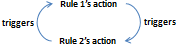
Caution must be taken when creating rules, in order to avoid circular references (i.e., recursive rules) that end up in an infinite loop. For instance, the following rules, Rule #1 Criterion: "FieldA" = 1 Action: Set the value of a field "FieldA" = 2 Rule #2 Criterion: "FieldA" = 2 Action: Set the value of a field "FieldA" = 1 where the result of a rule triggers a second rule that triggers once again the initial one, once and again.
That is the reason why the setting "Only trigger once" should be checked when creating a rule. Otherwise, a message will be displayed in application forms warning about the recursing attempt, and the record(s) with such a triggered field will be skipped while trying to import (which will be notified as a remark in the import log), however the remaining records in the import file will be normally imported. |