# Booking application
> Setup of the booking add-on, where external customers book time slots: required tables and fields with example values, example rules, and the users needed.
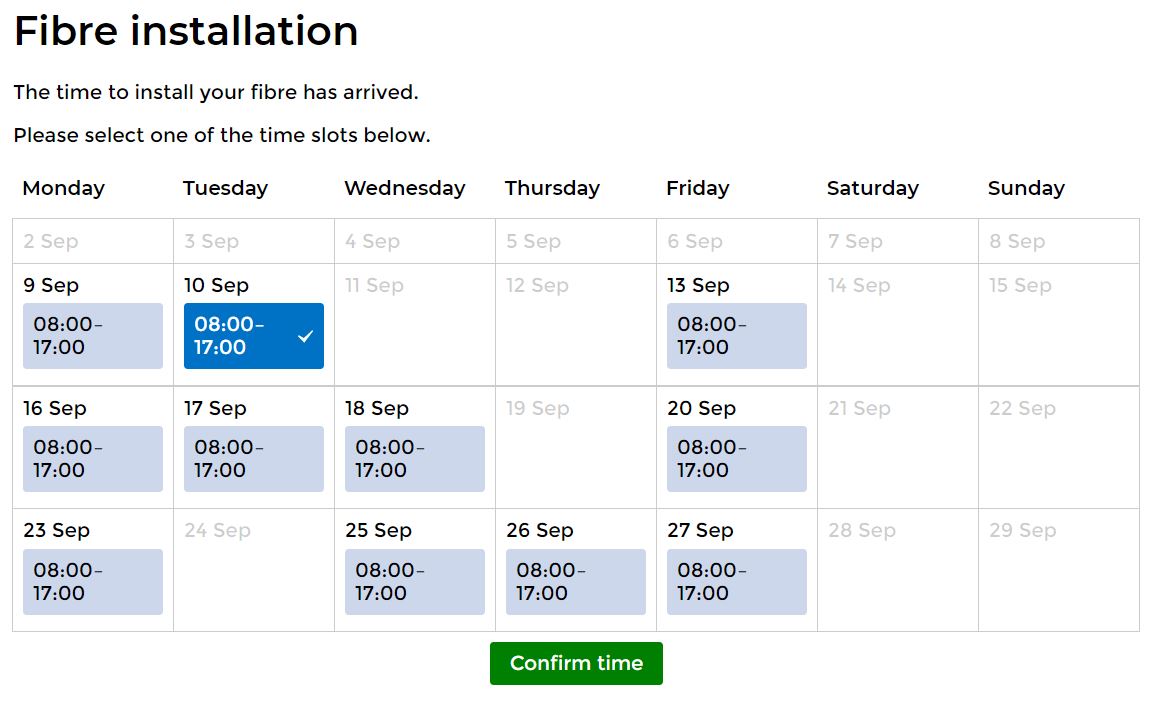
This is an add-on functionality where end-customers or other parties can schedule a service from your available time slots displayed on an external website.
If you are interested in having this module:
1. Contact IS Tools for proposal and setup.
2. Application configuration.
| Tables: Name | Fields: Name | Fields: Properties: Type | Fields: Properties: Rights for API role | Fields: Properties: Description | Fields: Properties: Example value | Fields: Properties: Guidelines for setting the field value |
| --- | --- | --- | --- | --- | --- | --- |
| _Invitation_
Represents the table to which you want to attach the booking to. This table doesn’t need to be a new table in the data model, but instead the necessary fields could be added to an existing table, for example, Property or Customer table. | BookingWebID | Text | Select | Unique Web ID per invitation | “hBfc3DpXw1" | See Example rules - “Set Booking WebID” |
| _Invitation_
Represents the table to which you want to attach the booking to. This table doesn’t need to be a new table in the data model, but instead the necessary fields could be added to an existing table, for example, Property or Customer table. | BookingURL | Text | Select | Unique booking link (that is later sent to the customer) per invitation | “https://api.istools.com/?GetURLFromIstools=hBfc3DpXw1” | See Example rules - “Set Booking URL” |
| _Invitation_
Represents the table to which you want to attach the booking to. This table doesn’t need to be a new table in the data model, but instead the necessary fields could be added to an existing table, for example, Property or Customer table. | BookingAllowedSlots | Text | Select | Determines which time slots that are presented to the customer, i.e. the allowed time slots to be booked. Written in the 24-hour notation in the form hh:mm | “08:00-10:00,10:00-12:00,13:00-15:00,15:00-17:00” | See Example rules - “Set BookingAllowedSlots for Booking type 1” |
| _Invitation_
Represents the table to which you want to attach the booking to. This table doesn’t need to be a new table in the data model, but instead the necessary fields could be added to an existing table, for example, Property or Customer table. | BookingStartDay
BookingEndDay | Dates | Select | Determine the limitation of the booking interval | 2019-11-30
2019-12-13 | Keep them in a related Campaign table where they are manually edited, or trigger them on an event that initiates a booking process (Note: if they are triggered with rules make sure the values are set before the booking URL is presented to the customer) |
| _Invitation_
Represents the table to which you want to attach the booking to. This table doesn’t need to be a new table in the data model, but instead the necessary fields could be added to an existing table, for example, Property or Customer table. | BookingAvailableNumberOfDays | Number | Select | Determines the number of days to be shown (within the interval)with available time slots after the first detected available slot | 10 | Should be managed in the same way as BookingStartDay and BookingEndDay |
| _Invitation_
Represents the table to which you want to attach the booking to. This table doesn’t need to be a new table in the data model, but instead the necessary fields could be added to an existing table, for example, Property or Customer table. | BookingInvitationText | Note | Select | Optional text to be shown above booking calendar | “Select a time slot for your service installation” | Set an unique text for each Invitation or a common text in a related table, through rules or manually |
| _Invitation_
Represents the table to which you want to attach the booking to. This table doesn’t need to be a new table in the data model, but instead the necessary fields could be added to an existing table, for example, Property or Customer table. | Campaign | Relation | Select | Relation to the Campaign table (which holds the booking capacity) | “Recordname of Campaign record” | Should be set by rules based on unique requirements and Campaign records |
| _Invitation_
Represents the table to which you want to attach the booking to. This table doesn’t need to be a new table in the data model, but instead the necessary fields could be added to an existing table, for example, Property or Customer table. | BookingAnswer | Text | Select | The answer from the customer, including start and end time of booking | “2019-12-04 10:00:00/2019-12-04 12:00:00” | Is set by the booking machine when the customer confirms a time slot. You need to handle the response by creating a timeslot in the Booking table (see Example rules - “Create Bookingfrom Booking machine”) as well as any other optional consequence of a booking. Tips: when creating a booking set a relation in each direction to and from the Booking record and the Invitation record (as in the rule example), in that way it is easier to transfer relevant data between correct records |
| _Campaign_ | BookingCapacity | Number | Select | Determines the capacity for parallel bookings | 5 | Set the value manually or trigger itthrough a capacity logic from a team management process within the application |
| _Booking_
This is the table that keeps a list of existing bookings, i.e. where you create and store a new booking made from the booking machine as well as all other events made in the application. The mandatory start and end time of the records in this table is used to calculate the availability based on the capacity. | BookingStartTime
BookingEndTime | Date times | Select | Start time and End time of Booking record | 2019-12-04 10:00:00
2019-12-04 12:00:00 | See Example rules - “Set Start and End time from Answer” |
| _Booking_
This is the table that keeps a list of existing bookings, i.e. where you create and store a new booking made from the booking machine as well as all other events made in the application. The mandatory start and end time of the records in this table is used to calculate the availability based on the capacity. | Campaign | Relation | Select | Relation to the Campaign table (to connect occupied slots, i.e., existing Booking records, with the right Campaign (and booking capacity) when calculating the available slots for a new Invitation) | "Recordname of Campaign record" | Should be set to the same value as corresponding parent Invitation record, through rules when created |
3. Rules
| Example | Properties: Tables | Properties: Trigger | Properties: Action |
| --- | --- | --- | --- |
| Set Booking WebID | Trigger table = Invitation
Target table = Invitation | Invitation = CREATED | Set the value of a field with a formula
BookingWebID = randomString(10) |
| Set Booking URL | Trigger table = Invitation
Target table = Invitation | BookingWebID = CHANGED | Set the value of a field with a formula
BookingURL = "https://api.istools.com/?GetURLFromIstools=" + VALUE(BookingWebID) |
| Set BookingAllowedSlots for Booking type 1 | Trigger table = Invitation
Target table = Invitation | Booking type = 1 | Set the value of a field
BookingAllowedSlots = 08:00-10:00,10:00-12:00,13:00-15:00,15:00-17:00 |
| Create Booking from Booking machine | Trigger table = Invitation
Target table = Invitation | BookingAnswer = INSERTED | Create a record
new Record of table "Booking" in group "STANDARD", relation "Invitation" will be set to rule target record, relation "Booking - Booking Machine" on the target record will be set to newly created record |
| Set Start and End time from Answer | Trigger table = Booking
Target table = Booking | Booking = CREATED (could be complemented with a type check if Booking records isn’t only created through the booking machine) | Set the value of a field with a formula
BookingAnswerStartTime = parseDateFormat( substring(relatedValue(REF(Invitation),REF(BookingAnswer)) , 0 , 19 ), "YYYY-MM-DD", "HH:MM:SS")
Set the value of a field with a formula
BookingAnswerEndTime = parseDateFormat( substring(relatedValue(REF(Invitation),REF(BookingAnswer)) , 20 , 39 ), "YYYY-MM-DD", "HH:MM:SS") |
4. Users
- Create an API role and assign correct record group rights and specified field rights for the Invitation and Booking tables. If values are placed in a related table, don’t forget to give the API role record group rights to those records as well, and field rights to corresponding relation field in the “invitation” table.
- Create API user and generate API key.
Example of a Booking application